Understanding the Docker OOM killer from inside a container
Recently I wrote an article about Datadog on Kubernetes. In that case, the Datadog jmxfetch Java process was killed by the host OOM killer because of JVM heap overallocation. I was quite surprised by that discovery. I already knew that containers and the host share the same kernel space, but I had assumed Docker would simply fail the container instead of actively intervening by killing the process.
Java has actually adapted well to widespread container usage by adding the -XX:+UseCGroupMemoryLimitForHeap option. It is very handy because applications can size their heap according to the resources allocated to the container, which helps with application scalability. You can find plenty of articles that explain this behavior in detail.
What I want to focus on in this article is how to inspect container resource limits and usage from inside the container itself. Sometimes, inside your application, you simply need to know the current resource limits and usage, just like the JVM detects cgroup limits.
Inspecting cgroup limits from inside a container
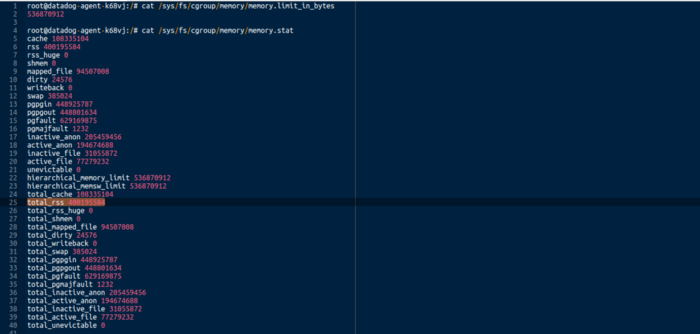
In Unix-based containers, you can inspect cgroup limits and usage under /sys/fs/cgroup.
 |
|---|
| Memory limit and usage inside your Docker container |
From there, you can find the total memory limit, and in memory.stat you can find the current RSS memory usage for all processes running inside the container.
Cgroups also expose many other system metrics, such as CPU, devices, and PIDs. The whole ecosystem is a bit complex, but a good reference can be found in the Linux kernel documentation here.
Mapping container PIDs to host PIDs
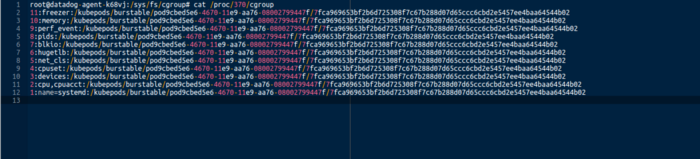
One last useful detail: you can find the PID mapping from a container to the host via /proc/$pid/cgroup.
 |
|---|
| Container to host PID mapping |
It is quite interesting.