Spark ETL with Airflow on Kubernetes — Part 1
Apache Airflow has become one of the most widely used ETL schedulers today. What I really like about it is that you write ETL pipelines in plain Python code. As my colleague Laurent once said: Airflow is great for simple tasks — do not try to implement complex logic in it.
The reason we introduced Airflow was to replace AWS Glue for historical data reprocessing, reduce AWS costs, and achieve code unity between our real-time and historical data processing pipelines.
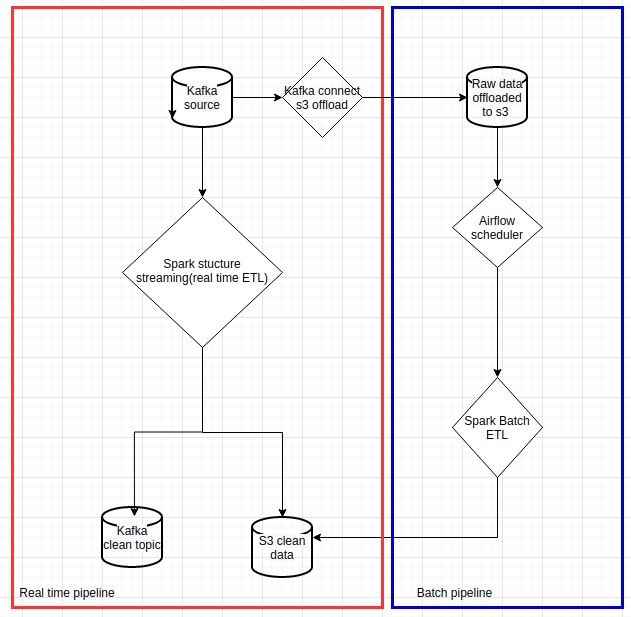
This article is the second part of my previous article about Spark data pipelines on Kubernetes. I will not cover basic Airflow concepts such as DAG or operator here. Instead, I want to focus on running Airflow on Kubernetes and using Airflow’s KubernetesPodOperator for Spark batch ETL reprocessing — the blue rectangle in the flowchart below.
 |
|---|
| Data pipelines with Spark on Kubernetes |
I will also list a few pitfalls and inconveniences based on my experience in Part 2 of this article.
Choosing an Airflow executor
Airflow Kubernetes executor
Airflow supports several executors, and the Kubernetes executor is worth mentioning here. This article gives a detailed explanation of the Kubernetes executor mode. The official documentation also gives useful insight into how it works behind the scenes.
Unfortunately, we could not use this executor mode because of a limitation with AWS EBS. Airflow on Kubernetes claims persistent volumes for logs and dags, and those volumes need to be shared between the Airflow web UI, schedulers, and workers, which in this case are Kubernetes pods. Our Kubernetes cluster runs on AWS EKS and uses AWS EBS for persistent volumes. Since AWS EBS volumes can only be mounted to one EC2 instance at a time, they cannot be shared across multiple pods running on different nodes.
We could have configured pod affinity so that Airflow worker pods always ran on the same node, but then we would have lost the main scalability advantage of using Kubernetes in the first place.
The tutorial I mentioned earlier does not include an Airflow deployment. If you want to try the Kubernetes executor yourself, you can use the official Airflow Helm chart. It should work well if your Kubernetes cluster does not rely on AWS EBS.
Airflow Local executor
Our Airflow setup is deployed with a Helm chart. We use puckel/docker-airflow as the base Docker image, and Kubernetes support is installed in the Dockerfile. We use Airflow 1.10.x.
We chose the Local executor for its simplicity. To ensure scalability, all Spark tasks are launched with the KubernetesPodOperator, which I explain in the next section. Only lightweight tasks actually run inside the Airflow instance itself. In other words, we take advantage of Kubernetes to scale Spark tasks, and we do not need to worry about Airflow worker capacity, because we simply do not have any workers.
You can check out our Airflow setup repository, which contains a Helm chart. It can run out of the box on local Minikube. Compared to the official Airflow Helm chart, ours is much simpler: the web UI and scheduler run in the same pod. Use it only with the Local executor.
Running Spark ETL with KubernetesPodOperator
Airflow KubernetesPodOperator
Do not confuse this with the Airflow Kubernetes executor. An Airflow operator describes a single task in a workflow. You can find the detailed definition here. The KubernetesPodOperator allows you to create tasks as Kubernetes pods.
Since our Spark ETL tasks run with KubernetesPodOperator, the Airflow instance acts purely as a scheduler and consumes very limited resources. An example DAG for historical reprocessing ETL is shown below:
1
2
3
4
5
6
7
8
9
10
11
12
13
14
15
16
17
18
19
20
21
22
23
24
25
26
27
28
29
30
31
32
33
34
35
36
37
38
39
40
41
42
43
44
45
46
47
48
49
50
51
52
53
54
55
56
57
58
59
60
61
62
63
64
65
66
67
68
69
70
71
72
73
74
75
76
77
78
79
80
81
82
83
84
85
86
87
88
89
90
91
92
93
94
95
96
97
98
99
100
# -*- coding: utf-8 -*-
"""
This is an example dag for using the Kubernetes Executor.
"""
import os

import airflow
from airflow.models import DAG
from airflow.operators.python_operator import PythonOperator
from airflow.contrib.operators.kubernetes_pod_operator import KubernetesPodOperator
from airflow.operators.bash_operator import BashOperator
from airflow.contrib.kubernetes.pod_runtime_info_env import PodRuntimeInfoEnv

DAG_NAME = "historical_process"
ENV = os.environ.get("ENV")

properties = """
spark.executor.instances=6
spark.kubernetes.allocation.batch.size=5
spark.kubernetes.allocation.batch.delay=1s
spark.kubernetes.authenticate.driver.serviceAccountName=spark
spark.kubernetes.executor.lostCheck.maxAttempts=10
spark.kubernetes.submission.waitAppCompletion=false
spark.kubernetes.report.interval=1s
spark.kubernetes.pyspark.pythonVersion=3
spark.pyspark.python=/usr/bin/python3

# kubernetes resource management
spark.kubernetes.driver.request.cores=10m
spark.kubernetes.executor.request.cores=50m
spark.executor.memory=500m
spark.kubernetes.memoryOverheadFactor=0.1

spark.kubernetes.executor.annotation.cluster-autoscaler.kubernetes.io/safe-to-evict=true
spark.sql.streaming.metricsEnabled=true
"""

historical_process_image = "dcr.flix.tech/data/flux/k8s-spark-example:latest"

envs = {
    "SERVICE_NAME": f"historical_process_{ENV}",
    "CONTAINER_IMAGE": historical_process_image,
    "SPARK_DRIVER_PORT": "35000",
    "APP_FILE": "/workspace/python/pi.py",
}

pod_runtime_info_envs = [
    PodRuntimeInfoEnv('MY_POD_NAMESPACE', 'metadata.namespace'),
    PodRuntimeInfoEnv('MY_POD_NAME', 'metadata.name'),
    PodRuntimeInfoEnv('MY_POD_IP', 'status.podIP')
]

spark_submit_sh = f"""
echo '{properties}' > /tmp/properties;
/opt/spark/bin/spark-submit \
--master k8s://https://$KUBERNETES_SERVICE_HOST:$KUBERNETES_SERVICE_PORT \
--deploy-mode client \
--name $SERVICE_NAME \
--conf spark.kubernetes.namespace=$MY_POD_NAMESPACE \
--conf spark.kubernetes.driver.pod.name=$MY_POD_NAME \
--conf spark.driver.host=$MY_POD_IP \
--conf spark.driver.port=$SPARK_DRIVER_PORT \
--conf spark.kubernetes.container.image=$CONTAINER_IMAGE \
--properties-file /tmp/properties \
$APP_FILE
"""

args = {
    'owner': 'Airflow',
    'start_date': airflow.utils.dates.days_ago(2)
}

with DAG(
    dag_id=DAG_NAME,
    default_args=args,
    schedule_interval='30 0 * * *'
) as dag:

    # Limit resources on this operator/task with node affinity & tolerations
    historical_process = KubernetesPodOperator(
        namespace=os.environ['AIRFLOW__KUBERNETES__NAMESPACE'],
        name="historical-process",
        image=historical_process_image,
        image_pull_policy="IfNotPresent",
        cmds=["/bin/sh", "-c"],
        arguments=[spark_submit_sh],
        env_vars=envs,
        service_account_name="airflow",
        resources={
            'request_memory': "1024Mi",
            'request_cpu': "100m"
        },
        task_id="historical-process-1",
        is_delete_operator_pod=True,
        in_cluster=True,
        hostnetwork=False,
        # important env vars to run spark submit
        pod_runtime_info_envs=pod_runtime_info_envs
    )
    historical_process
Two important points:
- When Airflow runs on Kubernetes, you absolutely need to configure
in_cluster=TrueinKubernetesPodOperator. This is not mentioned in the official documentation. - You must specify the
namespaceparameter inKubernetesPodOperator. Otherwise it will spawn the task in the default namespace, where you may not have permission.
Keeping batch and streaming code in sync
The historical reprocessing DAG is in the same code base as the Spark streaming job discussed in my previous article. With this setup, we achieved code unity between real-time and batch processing.
The spark-submit script lives directly inside the Airflow DAG, which gives full transparency into pipeline execution. If you want an even simpler DAG, you can also package the spark-submit script and Spark properties into the Docker image.
The Airflow task launches the Spark reprocessing ETL with Spark client mode. The driver, which is the Airflow task instance, then spawns six Spark executors to process the historical ETL workload. It is blazing fast.
Conclusion
I will draw the conclusions and list a few pitfalls and inconveniences of using Airflow based on my experience in Part 2 of this article.