Running Spark Structured Streaming on Kubernetes
There are many ways to process real-time data. At the company I work for, we use Kafka as our messaging service. Naturally, we first leaned toward Kafka streaming frameworks such as Kafka Connect and Kafka Streams. After about a year of experience, we realized the limitations were quite significant. They only handle Kafka as an input source, and we also had a hard time reprocessing historical data efficiently.
From a Kafka service perspective, keeping large amounts of data for a long time, for example more than 30 days, is not a great practice. So we persist our data to cloud storage on AWS S3. For historical data reprocessing, we used AWS Glue. That meant we ended up with one code base for real-time processing with Kafka streaming, and another code base for historical processing with AWS Glue. As expected, keeping both code bases in sync became painful. At the same time, we were also quite surprised by the AWS Glue bill.
That is where Spark came in. Spark can read from multiple data sources such as Kafka and S3, and it supports both real-time processing with Structured Streaming and batch workloads. In other words, we can use one code base to do both.
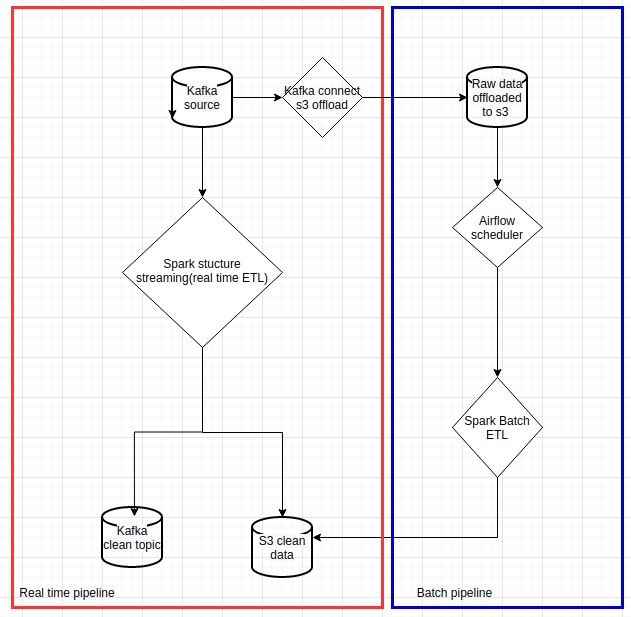
The following chart shows the pipeline we wanted to implement:
 |
|---|
| Data pipelines with Spark on Kubernetes |
In this article, I will focus on how to run Spark Structured Streaming on Kubernetes. This only covers the red box in the diagram above. I will write another article to cover historical processing.
Spark deployment modes on Kubernetes
Spark has had native Kubernetes support since version 2.3. The official documentation can be found here. There are several ways to deploy Spark on Kubernetes clusters:
We have experimented with all four. In the end, we kept client mode and local mode for our use cases.
Spark cluster mode
In Spark cluster mode, spark-submit creates a Spark driver pod, and the driver pod then creates executor pods.
Some important characteristics of this mode:
- The driver pod needs to run with a service account so that it can create Spark executor pods.
- The CI/CD runner or machine that runs
spark-submitneeds to contain the Spark binaries. - If the driver pod dies, the application is gone, because there is no built-in restart behavior at the Spark level in this setup.
As you can see, there are some major drawbacks with this approach. A streaming application is supposed to run for a long time, but Kubernetes can kill pods during node maintenance, rescheduling, or rebalancing. For us, that made this mode a complete no-go for long-running streaming jobs.
That said, if you want to try it, you can check out this repo.
Spark client mode
In Spark client mode, you can package the Spark driver inside a Kubernetes Deployment or ReplicaSet. This gives you a better operational model, because Kubernetes can restart the driver pod after disruptions, and your CI/CD runner does not need to contain the Spark binaries. A simple Helm deployment is enough.
However, client mode brings its own complications:
- Networking for client mode must be configured correctly.
- Spark requires a fairly long list of Kubernetes-related properties.
To configure networking for client mode, your Kubernetes deployment should expose environment variables such as the driver pod IP, name, and namespace:
1
2
3
4
5
6
7
8
9
10
11
12
13
14
15
16
17
18
19
20

    containers:
        - name: {{ .Release.Name }}
        ....
          env:
            # for client mode network configuration on spark-submit
            - name: MY_POD_NAME
              valueFrom:
                fieldRef:
                  fieldPath: metadata.name
            - name: MY_POD_IP
              valueFrom:
                fieldRef:
                  fieldPath: status.podIP
            - name: MY_POD_NAMESPACE
              valueFrom:
                fieldRef:
                  fieldPath: metadata.namespace
            ...
Then start the Spark driver with those environment variables:
1
2
3
4
5
6
7
8
9
10
11
12
13
14
15
16
17
18
19
20
21
# spark-submit is executed to start the Spark driver
# MY_POD_NAMESPACE / MY_POD_IP / MY_POD_NAME come from pod inspection in the deployment/pod
# KUBERNETES_SERVICE_HOST / KUBERNETES_SERVICE_PORT are native Kubernetes pod environment variables
# SERVICE_NAME is provided by the deployment and used as the service name
# CONTAINER_IMAGE is used for executor pods
# PROPERTIES_FILE is the Spark properties file
# PYTHON_FILE is the Spark application file
/opt/spark/bin/spark-submit \
--master k8s://https://$KUBERNETES_SERVICE_HOST:$KUBERNETES_SERVICE_PORT \
--deploy-mode client \
--name $SERVICE_NAME \
--conf spark.kubernetes.namespace=$MY_POD_NAMESPACE \
--conf spark.kubernetes.driver.pod.name=$MY_POD_NAME \
--conf spark.driver.host=$MY_POD_IP \
--conf spark.driver.port=$SPARK_DRIVER_PORT \
--conf spark.kubernetes.container.image=$CONTAINER_IMAGE \
--conf spark.pyspark.driver.python=/usr/bin/python3 \
--properties-file $PROPERTIES_FILE \
--py-files $PY_FILES \
$PYTHON_FILE
;;
You absolutely need to keep the following values consistent:
spark.kubernetes.namespace, spark.kubernetes.driver.pod.name, spark.driver.host, and spark.driver.port.
Here are some of the Kubernetes-related Spark properties we used:
1
2
3
4
5
6
7
8
9
10
11
12
13
14
15
16
17
18
19
20
21
spark.kubernetes.pyspark.pythonVersion=3
spark.kubernetes.allocation.batch.size=10
spark.kubernetes.allocation.batch.delay=1s

spark.kubernetes.authenticate.driver.serviceAccountName=spark
spark.kubernetes.executor.lostCheck.maxAttempts=5
spark.kubernetes.submission.waitAppCompletion=false
spark.kubernetes.report.interval=1s
spark.kubernetes.local.dirs.tmpfs=true
spark.kubernetes.container.image.pullPolicy=Always

spark.executor.instances=10
spark.kubernetes.driver.request.cores=100m
spark.kubernetes.executor.request.cores=1
spark.kubernetes.executor.limit.cores=2
spark.driver.cores=3
spark.driver.memory=16g
spark.executor.cores=2
spark.executor.memory=8g
spark.kubernetes.memoryOverheadFactor=0.1
spark.task.cpus=1
As you can see, the configuration is quite lengthy. You can check out our repo to run it locally on Minikube or deploy it to the cloud.
Kubernetes Spark Operator
The Kubernetes Spark Operator provides a clean declarative way to deploy Spark applications with YAML. It is simple and elegant. Unfortunately, it requires too many permissions for our Kubernetes clusters. For security reasons, we decided not to use it.
Still, I highly recommend having a look at the project and its examples.
Spark local mode
This is the simplest mode, and probably the right fit for 90% of use cases.
We started considering this option after running Spark client mode for a few months. At some point, I realized that we could take advantage of Kubernetes pod CPU and memory resource settings to scale Spark applications directly. In local mode, the upper limit is the capacity of a single Kubernetes node, and in many cases that is already more than enough.
By simply packaging a standalone Spark application in a Kubernetes deployment, we gained several advantages:
- No extra service account to set up
- Driver and executors run in the same pod, so there is no network exchange between them
- Driver and executors share the same heap space, which can improve RAM usage
- No lengthy Spark configuration
- No complicated client-mode networking setup
Spark startup script:
1
2
3
4
5
6
7
/opt/spark/bin/spark-submit \
--name $SERVICE_NAME \
--conf spark.pyspark.python=/usr/bin/python3 \
--properties-file $PROPERTIES_FILE \
--py-files $PY_FILES \
$PYTHON_FILE
;;
Spark properties:
1
2
3
4
spark_properties: |-
  # set spark master to local when spark_driver.mode is local, set number of executors in `[]`
  spark.master=local[6]
  spark.driver.memory=6g
For Spark application resource configuration, you can simply set Kubernetes resources:
1
2
3
4
5
6
7
resources:
  requests:
    cpu: 1
    ephemeral-storage: 1Gi
    memory: 6Gi
  limits:
    memory: 12Gi
As you can see, it is much simpler than Spark client mode.
We only keep Spark client mode for historical data reprocessing, because it can distribute executors across multiple Kubernetes nodes for better parallelism.
You can check out our repo to run it locally on Minikube or deploy it to the cloud.
Conclusion
Running Spark on Kubernetes is very convenient. Compared with running it on YARN or Mesos, you do not need to think as much about cluster capacity provisioning up front.
You can choose from several operating modes depending on your needs. Here is a simple summary to help with that decision:
| Spark mode | Configuration | Resilient | Permissions | Parallelism |
|---|---|---|---|---|
| Cluster mode | Lengthy | No | Admin on namespace | Up to cluster capacity |
| Client mode | Lengthy | Yes | Admin on namespace | Up to cluster capacity |
| Kubernetes operator | Clean | Yes | Admin on cluster for setup | Up to cluster capacity |
| Local mode | Clean | Yes | No | Up to single Kubernetes node |
Maybe I will write another article in the future with a deeper explanation of the Helm chart we use to deploy Spark.